Is Edge computing the only hope for service providers?
With billions spent on cellular networks, everyone asks about the killer use cases for 5G.
The new 5G Core is capable to provide ultra-low latency services opening the network to potential new user cases, but it can not solve on issue-The distance and latency.
However, this is not the issue of the 5G core either. This relates to physics where latency increases with distance.
That is where edge computing can come to the rescue.
Instead of bringing the traffic to the centralized cloud (in central data centers), which are far, bring the cloud resources to the user itself.
Edge computing brings intelligence to the network edge ( where edge infrastructure is deployed) and thus has shown the potential to open the network for the killer use cases for 5G like autonomous vehicles, connected cars, AR/VR, remote surgery, etc. Also, the increased use of edge devices because of IoT has resulted in a need to take real-time action on the data closer to the network edge.
There are a lot of articles on the internet on “what is Edge computing” but this article is different. As always the case I clarify the concepts by comparison. First, this is your one-stop-shop for understanding edge computing. Secondly, I will clarify the concepts by comparing them with cloud computing, further, also clarify by comparing “edge computing” with Multi-Access Edge Computing (MEC).
So stay tuned till the end.
Just one point though, I want to hold the discussion of MEC ( and its difference with edge computing), until I reach the point where I discuss the location of edge cloud as it will clarify the concept to you at that point. However, in one sentence, MEC is a subset of edge computing so the concepts apply equally.
Fair enough? Let’s proceed.
What is Edge Computing and MEC ? (Definition)
We are living in a connected world, With the enormous growth of connected devices, and the demand for ultra-low latency services, the proliferation of mobile devices, edge computing has picked up considerable momentum.
One of the signs of the growing interest is to see how many organizations are involved in the standards. There are many of them in edge computing: ETSI, 3GPP, Linux Foundation, GSMA to name a few, etc.
While each industry body has defined the word “Edge computing” I personally like the one form LF Edge body under Linux Foundation, which is short and comprehensive
“Edge computing represents a new paradigm in which compute and storage are located at the edge of the network, as close as both necessary and feasible to the location where data is generated and consumed, and where actions are taken in the physical world”
For context purposes, I will let me all also add the definition of MEC by ETSI as they own the standardization of MEC, but I will delay the discussion of the “Edge computing vs MEC” to the end as it is important to grasp some initial concepts first.
“Multi-access Edge Computing (MEC) offers application developers and content providers cloud-computing capabilities and an IT service environment at the edge of the network. This environment is characterized by ultra-low latency and high bandwidth as well as real-time access to radio network information that can be leveraged by applications”
So what is Edge computing in in simple terms ?
In simple words, edge computing refers to running “cloud” closer to network Edge. And “close to the Edge” means closer to the user.
But why would one run the cloud closer to the user in a decentralized way?
What are benefits of edge computing?
Reduced latency is the first and foremost benefit. Applications need to run closer to the user to improve the user experience.
But that is not the only benefit.
Reducing backhaul bandwidth is the second most important benefit.
With so many applications running at the edge, many of them, for example, video, sending the data all the way to the centralized cloud is bandwidth-intensive and hence CAPEX intensive too.
Why not just process them at the edge in a decentralized way, thus saving on that bandwidth ? and hence costs.
Hold on! Did someone say “decentralized”?
Isn’t it counter-intuitive to the concept of “cloud”?
Because when we think about the cloud we think of pooling the resources at a central place so everyone can use them.
On the other hand, Edge computing means resources are de-centralized.
So it is the right time to understand how Edge computing is different than cloud computing?
How is “Edge Computing” different than the “Cloud Computing” ?
To understand the difference consider the diagram at the left. All the processing and decisions on the data are done at the central place in the cloud computing case while in the edge computing case they are done closer to the user in the Edge cloud ( many clouds distributed).
You must note, HOWEVER, that edge computing is not a replacement for cloud computing. Not all applications run from the edge. Where latency requirements are not high and bandwidth requirements are low, it is always good to run these applications from a centralized cloud to take the advantage of resource pooling.
Also, many applications will need both cloud computing and edge computing. With user-intensive traffic processed locally at the edge and control traffic sent to the centralized cloud.
Therefore although edge cloud would not replace cloud computing, it will certainly reduce the need for it for some applications so it can be scaled down.
Centralized cloud vs Edge cloud
Let’s try to compare them on various characteristics.
Feature
Edge Computing ( distributed )
Cloud Computing ( Centralized)
Compute
Medium to Low computational capacity
High capacity compute resources placed at a central location
Latency
Reduced latency as the application is processed in edge
High latency. It depends on how far is the centralized cloud
Real-Time data processing
Best for real-time data processing
Does not provide as good results as Edge cloud
Backhaul Requirements
Very less as data is served from the edge so no need to see all data to centralized cloud
High backhaul requirements
Security Requirements
Higher security requirements as cloud surface is more
High-security requirements
Best for what kind of applications
Latency sensitive Or/and Bandwidth intensive
Latency agnostic and the bandwidth needs are low to moderate
Edge Computing vs Cloud Computing
After knowing the difference between Edge computing and cloud computing, it is time to move to understand the characteristics of Edge computing Characteristics/ Attributes of Edge Computing
So it should have the basic attributes of cloud computing, but it should offer more because of the distributed nature of the edge computing
The following are the important key attributes of Edge Computing according to ITU-T Y.3500 and this research paper. I am summarizing them for your easy reference
Now did you notice something?
While the latency and bandwidth are clear benefits that edge computing provides and discussed earlier but additionally edge computing offers network information and location awareness because of the close proximity to the network. This is important as the edge site is near to the access network, an application can take real-time action based on the radio network information ( in the case of the radio access network thus helping real-time applications)
Traditional Cloud Computing Attributes
Additional attributes because of the Edge nature
Broad network access like 5G/LTE, FTTH, WiFi
Multi-tenancySelf-service- Ability to provision without the involvement of cloud service provider On-demand
Rapid elastic and Scalable
Resource Pooling
Measurable Usage
Low latency
High Bandwidth- Provides high Bandwidth as processing happens locally
Real-time insight into Network information ( radio network for example) which enables taking action based on radio statistics ( applies to wireless access networks)
Location awareness- Can be aware of users locations by analyzing the information received from user devices
Cloud computing vs Edge computing
Where is Edge ? ( Location of Edge Cloud)
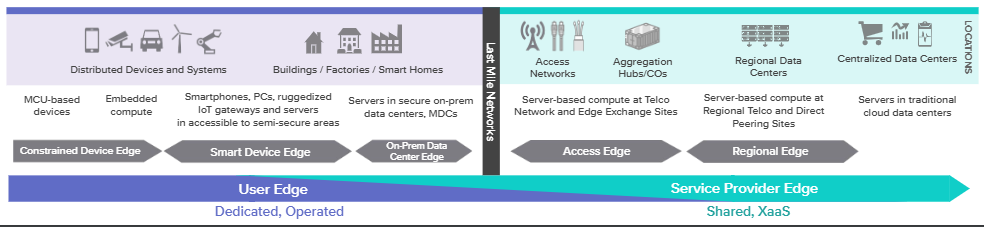
There are two distinct categories of Edge Data Center, the User Edge, and the Service Provider Edge
OK don’t get confused with the names, there are many types of names, there is deep Edge, Far Edge, Regional Edge, enterprise edge, etc..They may all be the marketing terms of vendors
However, as a starting point, I will say focus on two areas here. The service provider Edge and the User Edge. This is taken from LFEdge ( Linux foundation)
Service Provider Edge is where the network of the service providers is present while the User Edge is at the premises of the user. Now it does not mean that the service provider cannot manage the user Edge. In most cases, this will be the case, if a service provider establishes a DC within the premises of the customer OR puts a CPE inside the data center of the customer ( on-prem. edge computing solutions).
But broadly speaking, Service Provider Edge is the edge of the service provider network. A service provider may need to establish a small pop for the edge data center providing similar components as a traditional data center.
On each of these edge locations, you can put edge servers ( edge servers provide compute power)
Did you notice something?
If you look at the Service Provider Edge. The green color is extended inside the User Edge, which means that the boundaries of the service provider edge are not strictly defined. and it can go inside the customer premises also.
Also remember that edge services can be hosted in a private cloud as well as public clouds like Amazon web services, google cloud, and Microsoft Azure.
The Service provider Edge provides services over the fixed/mobile network infrastructure. This is a shared infrastructure which means it is not dedicated to one end user. CSPs can leverage their fixed and mobile networks at the edge and provide edge platforms closer to the user.
Access Edge Layer: closest to end device, can be zero or one hop away from the last mile network
Aggregation Edge Layer: The layer which is one hop away from access edge layer
Regional Edge: Often closer to Access Edge than the centralized data center.
User Edge
This is on the other side of the last mile network. Normally this is dedicated and customer-owned. Though it can be service provider owned/managed but dedicated for a single customer
Device Edge : Edge computing capabilities on the device or the user side of the last mile network. Often depends on a gateway in the field to collect and process data from devices. It may have limited compute/storage from user devices( phones, laptops , sensors etc)
Constrained Device Edge : This category includes micro controller based devices which are highly distributed. They can range from simple functions sensors that have no compute to programmable PLCs that have some compute capabilities
Smart Device Edge: This includes IOT gateways, smart phones and PCs.
Together the constrained edge devices and Smart Device Edge represent the “things” in IoT
After discussing Edge location, it is the right time to bring in a discussion of Multi-Access Edge Computing ( MEC)
Difference of Edge Computing and MEC
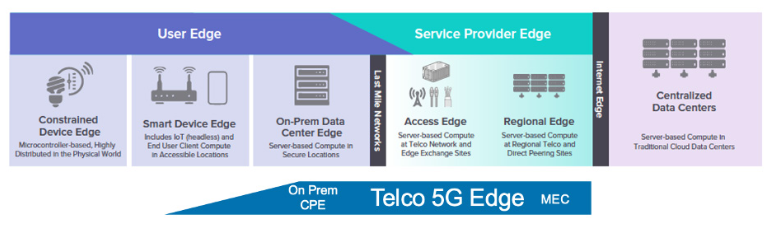
This diagram from LF Edge ( Linux Foundation) clearly shows, “MEC versus Edge computing”.
Edge computing is an umbrella word that includes MEC as a subset. MEC refers to the Telco Edge or the service provider Edge. ( MEC terminology/standards come from ETSI, initially called “Mobile Edge Computing” later on renamed as “Multi-Access Edge computing)
The end-to-end computing that includes User Edge and Service Provider Edge covers the complete scope of Edge computing.
However, MEC covers a subset scope and refers to the Edge computing provided by a service provider.
As shown here, the MEC cloud is offered by the network operator who owns the network. LF Edge also calls it Telco 5G Edge if the operator uses its 5G network to provide MEC services.
However, do note that MEC extends somewhat in the User Edge area also. This would be the use case where a Telco provides CPE at the customer site.
And do you know that operators have big leverage in the edge computing industry!
They own the “access network” which gives them leverage over the others. They own the 4G/5G network or broadband network for that matter which neither enterprises have nor the hyperscalers have. This is important as MEC had direct access to the network/radio quality, based on which MEC can take intelligent actions.
Neither Hyperscalers like AWS or AZURE have this kind of access network.
So if hyperscalers would like to deploy their Edge platform locally, they need to work out some sort of collaboration with the operators to use their network/physical sites and have a win-win business model for both.It has a huge monetization potential for Telcos
Use Cases of Edge Cloud
I already mentioned the big monetization potential of Edge computing/MEC. It would make sense to discuss the uses cases at this stage.
As you would see that with edge computing it is possible to bring intelligence to the remote locations. These are only few of the many use cases Edge computing has.
Gaming:
Edge computing enables placing gaming servers closer to the users, thus it is possible to reduce latency and provide a fully responsive gaming experience
Autonomous Vehicles/Self-Driving cars:
Autonomous vehicles require Edge computing servers for extremely low latency, so real-time action can be taken to prevent an accident
CDN and Caching
Video is the most popular service on the internet. Users may face low quality of service because of latency and limited bandwidth to reach remote video servers. Bringing video CDN closer to users can improve the quality of experience of the users. This is not limited to video, but any content can be brought to the network edge.
IoT and Big Data
Edge computing can facilitate computation and storage resources for IoT and Big data closer to the user ensuring a fast response to user requests
Industrial IoT ( IIoT)
With edge computing, industrial operators can perform critical analysis closer to sensors and machines reducing the latency for machine decision making.
Telemedicine
Remote medical diagnosis using telemedicine services will become more commonplace if we have better connectivity between patients and doctors. With edge computing, this becomes easier.
Smart Cities Services
In order to make cities smarter, there should be a lot of sensor nodes installed around the city. These sensors collect various kinds of data from different sources such as weather, air pollution, water level, etc..
Augmented Reality (AR)
AR can provide an immersive media experience to the users. For example in sports stadiums, “virtual cameras” present views from within the field of play, giving spectators the experiences from the perspective of the players themselves.
That’s it about an introductory guide on “what is edge computing and MEC”. With an edge computing model, service providers can monetize their networks effectively and improve customer experiences.
How do you view the potential of the technology, let me know in the comments below.
Software-defined Data Center is no longer a “marketing term” as many would make you believe.
Rather, it is a complete framework for building your next software-based data center backed by standards.
So it is important to understand a Software-defined data center ( SDDC)! But that’s not the only reason.
The other reason is the confusion out there in knowing the difference between SDCC and cloud.
Yes !
Many do not know if their applications are in SDCC or in the cloud. Whether they are establishing a cloud or SDCC.
And many still think the “Data Center”, as an enclosed four-walled structure housing communication cabinets within our “access”?
However, the data center has evolved since then. Applications have moved beyond a certain location to cloud somewhere else beyond our access. A Software-Defined data center is NOT just on-premises but has access to public (public cloud services) or works as a hybrid cloud.
So I thought let me comprehensively cover all these topics in a “Software-Defined Data Center tutorial” for you.
For example:
I know a lot of you will be interested especially in the last item in the table of contents, I am keeping it intentionally in the end as you can appreciate the differences once you know exactly what is SDDC. So you if know what is SDDC you can jump straight to the end, else you can follow the sequence of this blog.
What is Software-defined Data Center ?
SDDC started as a marketing term by one of the vendors back in 2012, however, it has taken off considerably after that with one of the standard body DMTF involve to defined the relevant standards related to Open Software-defined data center.
According to DMTF open Software-defined Data center is defined as follows:
“A programmatic abstraction of logical compute, network, storage, and other resources, represented as software. These resources are dynamically discovered, provisioned, and configured based on workload requirements. Thus, the SDDC enables policy-driven orchestration of workloads, as well as measurement and management of resources consumed”
“A data storage facility in which all infrastructure elements—networking, storage, CPU, and security—are virtualized and delivered as a service. Deployment, operation, provisioning, and configuration are abstracted from hardware”
Before we dig deeper into SDDC, it makes sense to know the difference between the traditional data center and SDDC
Difference between Traditional data center and Software-defined data Center
Traditionally data centers use physical infrastructure like physical servers, switches, and storage resources. Their scalability is located individually to each hardware element on site.( servers, switches, firewalls, storage systems, etc). Software-Defined Data Center uses “virtualization” to abstract all these hardware resources on-site providing highly scalable, efficient, and portable virtual compute, networking, networking, and security.
To understand SDDC, understanding Virtualization and Hypervisor is a MUST
With virtualization, we make a software version of something like compute, storage, and networking applications.
What makes virtualization feasible is the “Hypervisor”
The hypervisor is a piece of software that runs on top of a server. It divides the resources of the physical resource and allocates them in the virtual environment. So with the hypervisor, we can turn a physical server into virtual machines ( VMs) with dedicated CPUs, memory, and operating systems.
Once we have the VMs, Instead of having one application on the physical server, we can have multiple applications on the same server resulting in efficiency and cost savings. This is also called virtualization.
Components of Software Defined Data Center
Software Define Compute ( Compute virtualization)
This is the first step towards the SDDC and is also explained under the hypervisor above; this is also called server/compute virtualization or physical hardware virtualization. This lets you run virtual servers on top of a physical server. In simple terms, the CPU and memory of the physical server is allocated to the virtual server
Software Define Network ( Network Virtualization)
The software-Defined networking enables network abstraction and lets you provision and run networks independent of the hardware networking components. One of the challenges with the growth in virtual machines is that the current networks do not facilitate the migration of VMs from one DC to another DC. The IP addresses of VMs are tightly coupled to the physical networks which makes migration very complex. To solve this issue, network virtualization enables virtual overlays that run on top of the physical network/underlay. . This overlay enables hiding of the IP addresses from the physical underlay network thus making the migration of VMs, a breeze. In addition network virtualization brings flexibility and open doors for innovation as new services can be launched without any dependence on the upgrade of the networking hardware
SDN in Data Centers
Software Defined Storage ( Storage Virtualization)
Software-defined storage separates storage software from its hardware. SDS runs on industry-standard x86 servers versus the traditional NAS or SAN systems. Decoupling storage software from hardware enables a lot of flexibility. The storage capacity can be easily expanded as there is a need for expansion.
Storage has come of age. Traditional monolithic storage is sold as a bundle of industry-specific hardware and proprietary software. With the SDS, there is no need for specific hardware, also the SDS adds a software layer between the physical storage and the data request, This enables the use of APIs to manage and maintain the storage of devices. The storage can be scaled out easily while automation can bring the costs down.
Software-Defined Storage
Automation and Orchestration layer
Simply virtualizing functions is not enough. With so many moving pieces in an SDDC, it is mandatory to have a robust automation and orchestration layer. Automation refers to automating a single task like spinning up a VM while orchestration refers to automating a collection of tasks in a certain sequence like spinning up a VM, assigning an IP address then creating a virtual network, etc. A central Orchestration and automation layer can be used to efficiently allocate resources, configure them, update them, monitor operations and take autonomous actions based on close loop controls.
SDDC Architecture:
SDDC architecture as provided by the DTMF is shown in the figure below.
Few of the points related to the architecture
1. At the lower layer is the resources. The resources shown are storage, network, and compute. There can be other software and services ( for example security components like firewalls, IPS, IDS to facilitate security as a service) in addition to the external cloud, which can be a public cloud.
2. One of the most important layers is the “DAL” i.e Datacenter Abstraction layer. The DAL layer abstracts the resources towards the users at the upper layers. This abstraction is done in the standard way providing standard APIs. For example, DTMF has defined the common information models, CMDBf, and OVF formats.
3. The management of the resources is done through SDDC management automation software that has an end-to-end view of the resources. The management interface is defined in CIMI ( Cloud infrastructure Management Interface)
Resource Pooling helps save costs. Instead of buying individual servers and networking hardware, which can over-dimension the hardware, the same hardware can be partitioned using virtualization. Multiple VMs, for example, can be hosted on a single server instead of spinning up a server for each new application.
Scalability and Elasticity
Seamless ability to scale the infrastructure as and when desired. Elastic resources to scale up and scale-out on-demand brings high scale scalability
Agility & Automation
The time to provision services is decreased. It does not take days and months to provision a server, an application, and configure networking. All are software-based which can be done instantaneously. Virtualization combined with automation/orchestration is a real-time saver and opens the door for innovation. The automation layer can be used to efficiently allocate resources, configure them, update them, monitor operations and take autonomous actions based on close loop controls.
APIs & Programmability
Simplified data center management is another benefit. There are common information models through which resources can be programmed facilitating services management through a single dashboard to internal or external parties.
Software-defined Data Center vs Cloud
In order to understand this difference, it is important to refresh the definition of cloud.
What is Cloud?
Let’s take the definition of cloud according to NIST
“cloud computing is a model for enabling ubiquitous, convenient, on-demand network access to a shared pool of configurable computing resources (e.g., networks, servers, storage, applications, and services) that can be rapidly provisioned and released with minimal management effort or service provider interaction.”
The NIST definition lists five essential characteristics of cloud computing:
on-demand, self-service,
broad network access,
resource pooling,
rapid elasticity or expansion,
measured service.
It also lists three “service models” (software, platform, and infrastructure), and four “deployment models” (private cloud, community, public, and hybrid) that together categorize ways to deliver cloud services”.
Difference with SDCC
By comparing the earlier definitions and architecture of SDDC with that of Cloud it is clear that SDDC focuses more on the architecture and defining the standard interfaces ( for example datacenter abstraction layer) while cloud is more focused on the services and capabilities. However, if you read the definition of cloud clearly, there is nothing in this definition that the SDDC is not able to provide.
Therefore we can say that “Software-defined data center (SDDC) provides the components and architecture to build a cloud. Further, Open SDDC is one way to build the cloud. But there could be other ways to build the cloud, for example, any vendor-specific architecture.
To make it simple we use “SDDC” to build “cloud”
Its your turn to tell me what is your understanding of SDDC and cloud? and do you agree with this way of explanation?
The “Overlay vs underlay” discussion is important as overlays are everywhere in networks- in the Datacenters (DCs) and in SD-WAN.
And there are many tutorials out there explaining overlays and in particular difference between overlay and underlay. However, they are difficult to understand, and more importantly, they do not address the most important point – what problems overlays are trying to solve. What are the limitations in the underlays that triggered a need for the overlays?
Therefore this blog takes you step by step on the concept of underlay, its limitations, and how overlay solves it.
I will do so using SD-WAN as a reference, but the concepts are the same in the Datacenter i.e SDN in Datacenter also uses the concept of overlays.
Difference of Overlay and Underlay networks in summary
Overlay vs underlay in summary An Underlay network is the physical network responsible for the delivery of packets like DWDM, L2, L3, MPLS, or internet, etc. while an overlay is a logical network that uses network virtualization to built connectivity on top of physical infrastructure using tunneling encapsulations such as VXLAN, GRE, IPSec.
Why overlay networks are important and worth discussing?
Do you know that traditional routers and switches are hardware-centric and perform packet forwarding based on the destination IP address, therefore network segmentation and multi-tenancy are not possible.
This creates the following inefficiencies and drawbacks: Network segmentation and network slicing are not possible – duplicate IP address ranges cannot traverse a single IP network natively; Scaling is hard. VPNs can solve these issues albeit with some inefficiencies as they are very transport medium centric and explained below.
On the other hand, the overlays bring the flexibility that underlay is not able to provide. Overlays have been there for a quite while but with the SD-WAN they have become very popular.
This blog uses the example of SD-WAN, but the concepts and advantages are exactly the same for the Datacenters, you will just replace the CE router with a virtual machine ( VM) that needs to communicate with Spine switch which is the CE a the HQ in this example. The underlay network is the MPLS here, it can be any routing protocol in Datacenter like OSPF, BGP, etc.
Let’s start to understand underlay before going to overlay
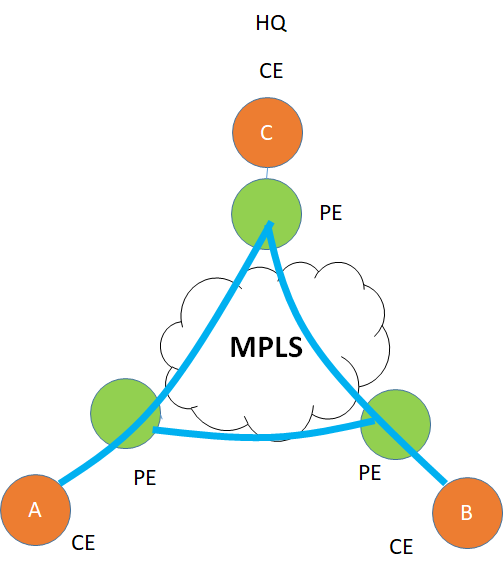
Let’s take the example of a common physical infrastructure for example a WAN network, In which a customer has three sites A, B, C with the C as the HQ which are all physical devices. There is a layer 3 IP/MPLS VPN between the 3 sites which is the underlay for this customer.
This is a Peer-based VPN, which means that the CE ( Customer Edge) peers with PE ( Provider Edge router), exchange routes, and then how the routes are advertised between the PE is the responsibility of the MPLS provider and not the customer who owns CE. Once CE handovers traffic to PE, it forgets on how it is transported inside the Provider network and which route it takes.
Traditional MPLS
What problems underlays cannot solve?
While the above shows a simple example of a Layer 3 underlay. Things have changed beyond the use of just “MPLS” for transport. Think of it! internet is everywhere. High-speed data is cheaper than before. Exploiting the use of the internet for carrier transport is just a natural evolution then.
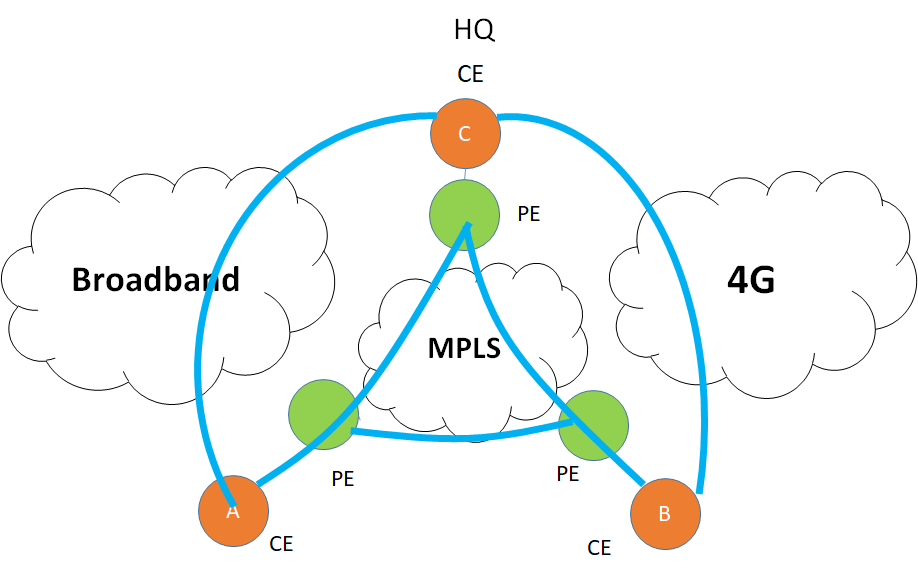
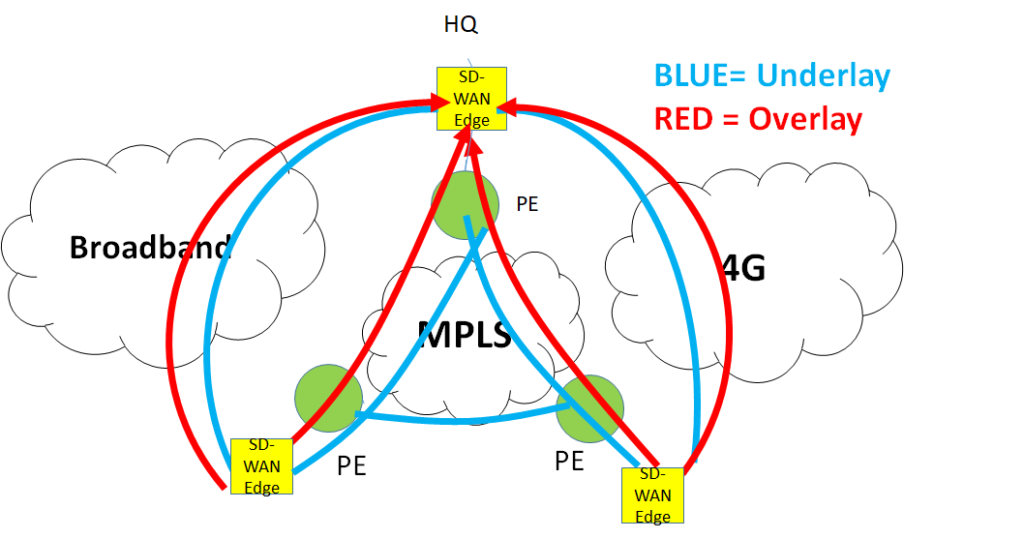
To understand the concept of overlay, I introduced two more networks. A broadband network and the 4G network. The need is to use these “low cost” transport networks to offload some of the data from the MPLS network ( if not all)
There are some issues here :
Traditional underlay
Issue 1: The Internet cannot be used as an underlay for private traffic
The first issue is that internet medium natively is insecure so it cannot be used as an underlay for private traffic. To protect it we will need to use security protocols like IPsec. IPsec is a tunneling protocol. Which is an overlay. ( but we wanted to solve the issue with underlay, isn’t it? )
Issue 2: Transport Dependence is too restrictive
Let’s for the moment assume that the internet is secure so we kill the first argument against the underlay. The customer wants to divide the applications between the different circuits ( for example YouTube on 4G, A SaaS app on broadband, and email on MPLS). Further, he wants to use the backup of MPLS as broadband. All this is possible but very complex and static which means if the customer wants to change the application’s distribution over the circuits. He needs to change his configurations which is operationally NOT easy. To put it simply the configurations are hardware-specific, which means they are specific to the physical underlay and complex to change.
Issue 3: Multi-Path forwarding
The customer wants load balancing by combining underlays of different types.
However, it is very complex ( if not impossible) to use multiple underlays which are of different types, simultaneously to forward traffic from source to destination.
Welcome to the Overlay Networks. The software instead of hardware is the solution
Until now we learned that if we stick with the underlay, it can restrict us in multiple ways. In order to get transport independence, overlays can come to our rescue.
Overlays are software-based and not dependent on transport. It’s like a virtual network ( virtual links) on top of the physical network. This virtual network needs to have underlay created first.
The trick is simple. Create an underlay once and forget it. Now create overlays on top of it and since they are software-based. changing the configurations is super easy and friendly. Underlay is a pipe on which overlays run. The intelligence is all in the overlay.
However, to have overlays in SD-WAN, we will need a special CPE called SD-WAN edge device. These overlay nodes are installed at all the sites.
overlay vs underlay in SD-WAN
How Overlays are formed?
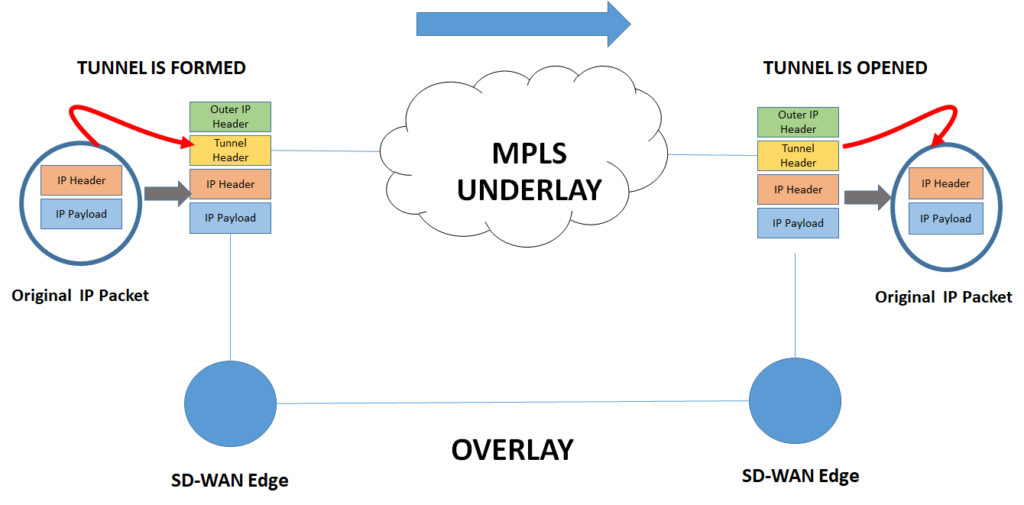
The following example shows a GRE tunnel formed by SD-WAN Edge Device. The edge device adds a GRE tunnel header with a new IP header and masks the inner IP header from the MPLS domain, the MPLS forwards based on the outer IP header.
Once the packet reaches its destination, the SD-WAN edge removes the outer IP header and the Tunnel header and what we get is the original IP packet. During all this process the overlay is not aware of the underlay.
The same process can be done for the internet underlay but with the addition of encryption using IPSec. All this can be done seamlessly using the same SD-WAN Edge box.
The overlay is formed once encapsulation happens at the left SD-WAN box and ends when the header is removed at the destination. The overlay is not aware of the underlay on which it is riding. The underlay here is MPLS but it can be any other type of transport.
How Overlay networks solve the issues ( Advantages of Overlays)
1, the Security issue is solved by using encryption. A Public underlay such as the internet is not trusted. SD-WAN edge solved that issue through the use of IPsec ( This solves issue 1 above)
2. Transport Independence. The same SD-WAN overlay can seamlessly connect to multiple different media like the internet, MPLS, L2 media, etc. The overlay does not care about transport media as it is using tunnels. With this, it opens the world of innovation and flexibility in the services. The intelligence is now in the software and not in the hardware. The applications can be dynamically forwarded and distributed between the 4G, broadband, and MPLS. There can be multiple ways in which traffic can be protected between different transport media. ( This solves issue 2 above)
3. Considering overlays are transport agnostic, there is no limit on the number of multi-paths that can be used in overlays to carry traffic from source to destination for the purpose of load balancing. This makes overlays very scalable.
So in summary overlays wins in all cases and that’s why they have become popular these days.
Overlay vs Underlay in summary
Items
UNDERLAYS
OVERLAYS
Definition
Underlays networks are the physical networks responsible for the delivery of packets like DWDM, L2, L3, MPLS, or internet, etc.
while overlays are a logical network that uses network virtualization to built connectivity on top of the physical network using tunneling encapsulations such as VXLAN, GRE, IPSec.
Encapsulation
Does not require encapsulation
Requires encapsulation such as VXLAN, GRE, etc
Application Segregation
Very complex to divide applications across different underlays
Very easy to achieve this
Hardware or software
Hardware-based connectivity.
Software-based connectivity
Multi-path forwarding
Complex to set up multipath forwarding
Inherent support for multipath forwarding
Scalability
Limited scalability as hardware-dependent
More scalable as software-based and because of the multi-path capability
Security
Physical underlay such as the internet is not secure
Security can be easily added using encryption methods such as IPSec.
Deployment time
Long deployment cycle as hardware-dependent
Quicker deployment time. Adding and changing services is very quick
And you know that the minimum latency needed for 5G is 1 ms or less.
What if I tell you that you may be completely misunderstanding how this latency works in “5G”
For example, tell me the following.
Is the latency from the cellphone to the core?
Is it from the base station to the application?
Is it a round trip or one way?
Let me tell you, I do see a lot of confusion here. I do find a lot of well-meaning people make an unintentional “mistake”.
For example, it is very common to use “round trip delay” for all latencies when in fact it is a “one-way delay”.
If you start with the wrong reference, you end up with the wrong answers. An application hosted in a data center placed with the understanding of round trip time “RTT” will have a different distance from the reference point than one placed with a one-way delay.
Wrong placement of data center is a wrong CAPEX investment. Above all, it can result in a bad customer experience for the low latency service.
Understand the “Latency Reference” before the “Latency”
Do you know that knowledge about 5G latency is important but a more important thing is how the latency is defined itself? or the “Latency Reference”
I will help you clarify the concept with this blog piece and I will use the main industry references i.e. NGMN and 3GPP.
More specifically
This blog piece will clarify the following points
Exact reference for latency measurements to clarify the confusion.
Latency values for different uRLLC use cases in 5G
Also perhaps you want to establish Edge Cloud or MEC so you are interested in knowing the correct 5G latency reference and values
Why it is important to discuss 5G latency in the first place?
As the 5G moves to an era of new services like low latency uRLLC, latency becomes a critical factor in dimensioning the cellular network. This is also important when designing a cellular network for network slicing.
Life was quite easier with the initial 5G services like “eMBB” that require faster speed, however, It is no longer the case for latency-prone uRLLC services.
A common perception is that the most important benefit 5G brings is higher data speed. However, 5G is designed to support other services that do not necessarily need high speed but need low latency.
What are these 5G terms?
eMBB vs eMTC vs uRLLC
eMBB: Enhanced Mobile Broadband-High data rate and high traffic volume- This is the first use case for 5G that supports high bandwidth broadband/download speed. mMTC : Massive Machine-Type Communication: Massive number of low cost, low energy devices. A common example is a massive number of IoT devices in a small geographical area. It is characterized by low bandwidth but high density per given area/high connection density. uRLLC-Ultra-Reliable Low-Latency Communication: This is characterized by very low latency communication. ( some less than 1 msec). Some examples are Self-Driving car, Robots Control, factory automation, Remote Surgery, virtual reality, etc
Clarifying “Latency Reference”. Is it One Way or Round Trip
We will use NGMN and 3GPP as reference for our discussion.
Let’s start with the NGMN reference as 3GPP is using NGMN for latency references.
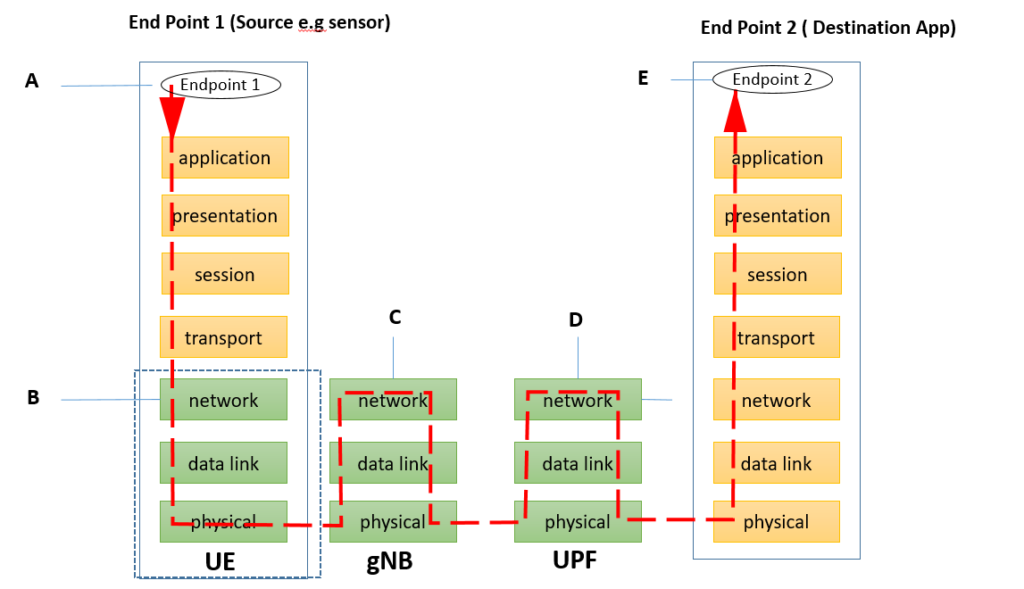
Consider a simplified network stack shown for typical network architecture.
A source system with seven OSI layers and a destination system with the seven OSI layers. The mobile network includes RAN ( Radio access network) the core network and the application server.
The source talks to the destination, for example, “End Point 1” ( like a sensor or it can be an application on the cell phone) talks to the End Point 2, which is the Destination App. This is the location that hosts the server where Destination App resides.
So according to this paper from NGMN, “End to End latency” is defined as follows:
“End-to-end latency is defined as the time that takes to transfer a given piece of information from a source endpoint device to a destination endpoint device, measured at the application service access points, from the moment it is transmitted by the source endpoint device to the moment it is successfully received at the destination endpoint device”
Terms :
UE: User Equipment-An equipment that allows a user access to the network services. For example a cell phone gNodeB: This is the base station in 5G and part of the Radio Access Network. Alternatively, it can be a base station (eNode B) in 4G in this architecture.( in layman terms it is the cell tower) UPF: User Plane Function: UPF is an important component of 5G core network. Think of it a gateway through which packet flows to the applications and contribute to user plane latency. An application’s example is youtube or Facebook etc.
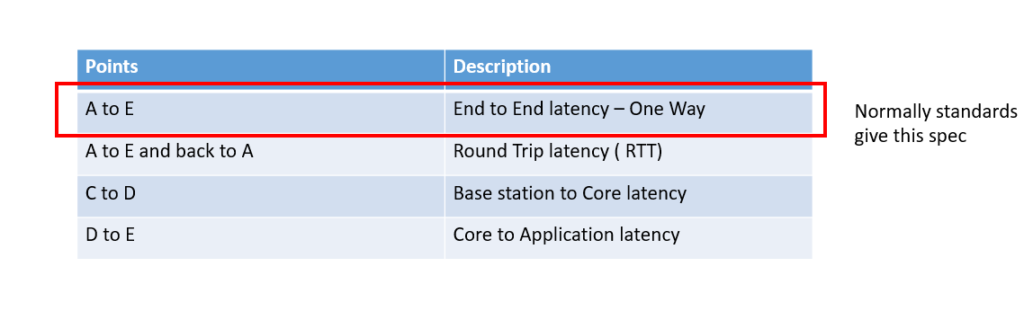
So, when the NGMN or 3GPP uses the word E2E ( End to End) latency, it is the one-way latency. In this diagram it is the latency from Point A to point E. However normally people assume that is the End to End latency. In contrast, E2E latency is from A to E and the reverse, which is E to A.
But there are other latencies too as shown is the table below. But whenever the standard bodies are referring to the latencies, it is from the source to the end point which includes the application
Latency References
Now lets look at another reference. This one is from 3GPP. This one also shows End to End latency and its thresholds.
5G Latency Requirements ( Latency thresholds in 5G from 3GPP)
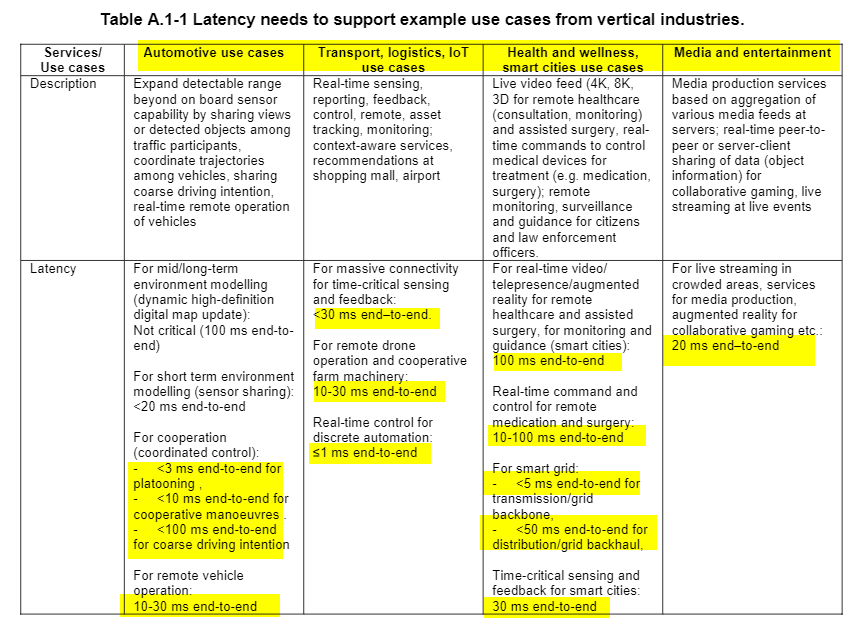
So now lets take an example of latencies from standard bodies. We will refer to the 3GPP TS 22.261, Service Requirments for the 5G. All these latencies are one way. In fact, 3GPP is using NGMN as a reference for these latencies.
This standard defines the End to End latency as following
“End-to-end latency: the time that takes to transfer a given piece of information from a source to a destination, measured at the communication interface, from the moment it is transmitted by the source to the moment it is successfully received at the destination”
So lets clarify some of the FAQs
Conclusion: End to End latency is one way and NOT a round trip?
Usually, NGMN and 3GPP specify End to End (E2E) latency which is “one way”. However in In few cases, it will mention round trip latency but it will clearly specify “round trip”. Here is the definition of end-to-end from 3GPP TS 22.261
end-to-end latency: the time that takes to transfer a given piece of information from a source to a destination, measured at the communication interface, from the moment it is transmitted by the source to the moment it is successfully received at the destination
Why it matters to know that it is a one-way or round trip?
The whole science of placing the application closer to the user is dependent on the latency budget, a wrong decision can lead to the wrong placement of the Data center. Wrong placement will lead to impact the uRLLC services designed for low latency applications.
Is 1ms ( millisecond) the minimum latency requirement for 5G?
As opposed to popular belief, 1 ms latency is not required for all services. Some services have relaxed latency requirements. The figures above take from 3GPP TS 22.261 show only 1 service that requires less than 1 ms latency i.e. Real-time control for discrete automation. This includes use cases such as motion control of robots, machine tools, factory automation etc
How is this latency different than the Fronthaul latency?
Fronthaul latency is a different latency than the E2E latency budget. The fronthaul latency helps in deciding where to place the DU/BBU rather than application itself
So that’s it about the latency. It is important to know the limits when you are designing the network for low latency applications , be it Smart Grid, Autonomous Driving, factory automation, self-driving car etc. This will severely affect the quality of service if the network is not properly designed for the required latency. Also it will also mean that the network slicing is not properly dimensioned for latency.
Tell me in the comments below what do you think about this article or the 5G latency
Looking for Open RAN tutorial ?
What is Open RAN/O-RAN and why it matters for mobile operators and vendors?
In fact, as wireless networks continue to grow, O-RAN is becoming more relevant for Mobile networks.
For one, disaggregation of RAN has remained non-existent. Thanks to a few big vendors’ monopoly. The RAN has been largely a closed vendor system.
In fact, Open RAN has taken the Mobile Networks industry by storm and for one reason: It refers to the commoditization and disaggregation of RAN hardware.
There are a lot of tutorials on Open RAN but they miss the point in explaining what problem Open RAN is trying to solve.
Secondly, the tutorials do not tell about what is the 3GPP interfaces versus the O-RAN interfaces.
I will explain this as well as the Open RAN architecture, and all the important terms that you should know.
And I will do it in an easy to follow manner.
But hold on , there is another term-OpenRAN (without space between Open and RAN), and I should clarify it first as it is different than Open RAN ( the one with space)
Open RAN vs OpenRAN
OpenRAN without space is different than Open RAN with space.
In fact, these terms confuse the beginners a lot.
Open RAN, or O-RAN, is the initiative of the O-RAN alliance that aims to define open interfaces of split RAN architecture. The group focuses on the development of open and virtualized interoperable RAN specifications. In this article, we will focus on exactly this topic.
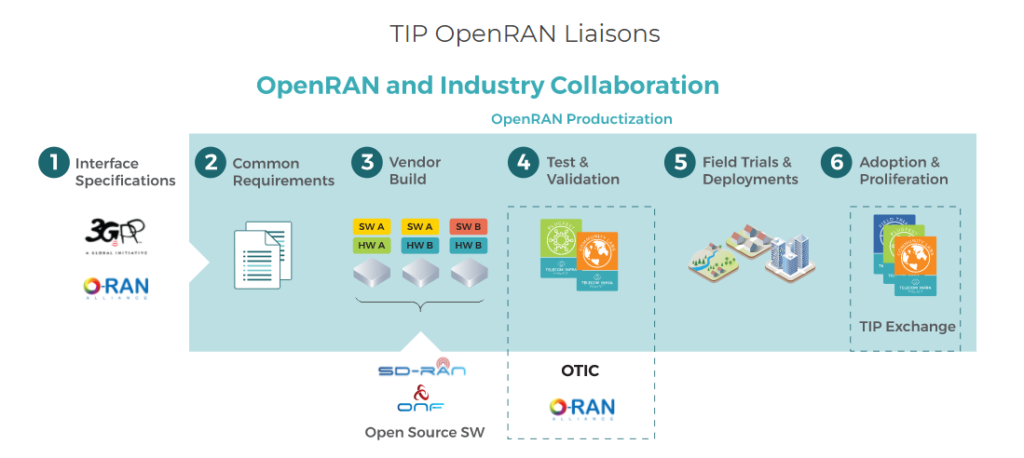
OpenRAN, on the other hand, is a project by Telecom Infra Project that aims at disintegration in the 2G/3G./4G/5G RAN by having multi-vendor interoperable solutions built on general-purpose hardware (COTS).
OpenRAN does not define new Open interfaces but speeds up adoption and deployments through the use of existing open interfaces. In that respect, it works closely with the O-RAN Alliance to re-use their interfaces doing no overlapping work.
Not only O-RAN but it works with the other industry bodies like 3GPP, ONF to facilitate a holistic end-to-end RAN solution. This diagram better summarizes the relation between OpenRAN and O-RAN.
So lets discuss the real topic in this article, i.e. Open RAN.
O-RAN ALLIANCE, founded in February 2018 by AT&T, China Mobile, Deutsche Telekom, NTT DOCOMO and Orange. It has been established as a German entity in August 2018.
The specification effort => new standards for open and intelligent RAN
O-RAN Software Community => open software development for the RAN (in cooperation with the Linux Foundation)
Testing and integration effort => supporting O-RAN member companies in testing and integration of their O-RAN implementation
What Problem Open RAN is trying to solve?
To answer this question, we should first understand the nature of RAN.
Isn’t RAN a closed system? In fact, the RAN edge is an example of a perfect vendor lock-in.
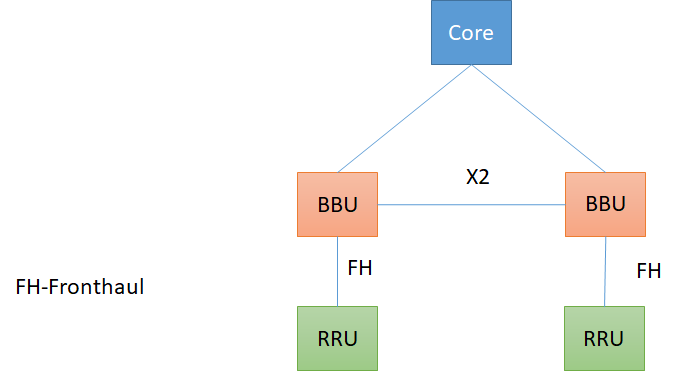
Unfortunately, 3GPP has not defined the interface between the radio unit (RRU) and the BBU as shown in the figure. They have left this to the vendors to implement. Consequently, the interface between RRU and BBU is a closed interface ( also called fronthaul)
And guess what!
The mobile operators must buy both RU and from the same vendor.
Yes,
Even if the operator wants to mix and match vendors between the RU and BBU, he cannot do it. (The traditional CPRI interface between RU and DU is still a proprietary interface, although agreed by a few big vendors)
But that’s not all.
While fronthaul is the major component, there are other components in RAN as well. For example, the X2 interface between eNodeBs is also a closed interface.
This is even worse.
How ?
As you are aware that in NSA ( Not standalone) 5G uses the same core as 4G but works in coordination with 4G access network using X2 interface. If X2 interface is closed, that means that the 4G and 5G vendor needs to be the same, otherwise they will not inter op. O-RAN alliance is working on making all these interfaces open and standardized.
So the big problem O-RAN is solving is making all these components interoperable so one can mix and match the vendors.
Traditional RAN
Is Open RAN the same as C-RAN or Virtual RAN (vRAN)?
No, it is more
The debate between Open RAN and Virtual RAN is interesting.
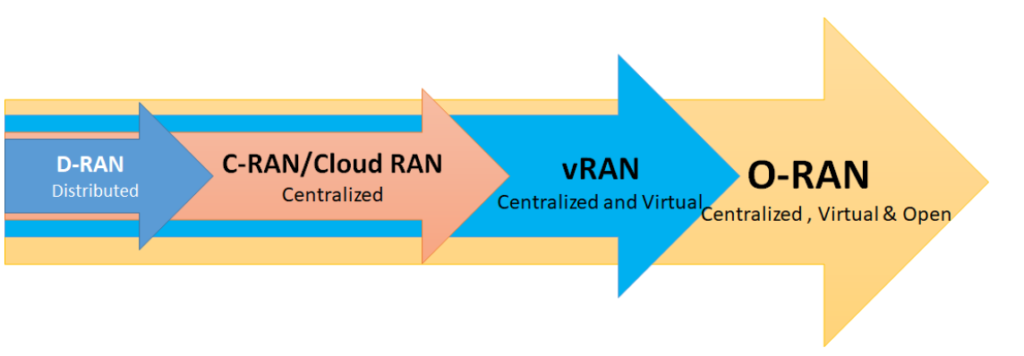
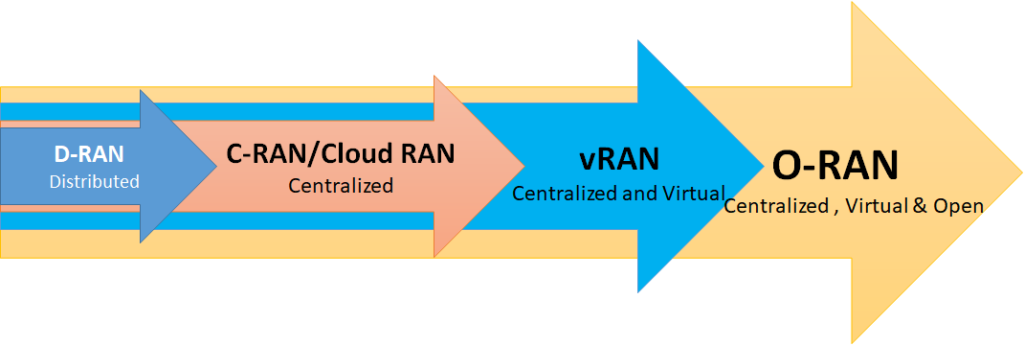
The following diagram summarizes the differences. And I have written this article on what are the differences. In summary, Open RAN is the type of Virtual RAN that uses Open interfaces between RAN components while C-RAN/vRAN does not. We will now study all these components one by one.
I will also recommend to go through the article to understand the role of RU, BBU, DU, CU etc.
D-RAN vs C-RAN vs vRAN vs O-RAN
Components of Open RAN/ O-RAN ( Open RAN tutorial)
Let’s go through the O-RAN architecture. The components are hosted virtually on servers using virtual machines or cloud native technology such as containers.
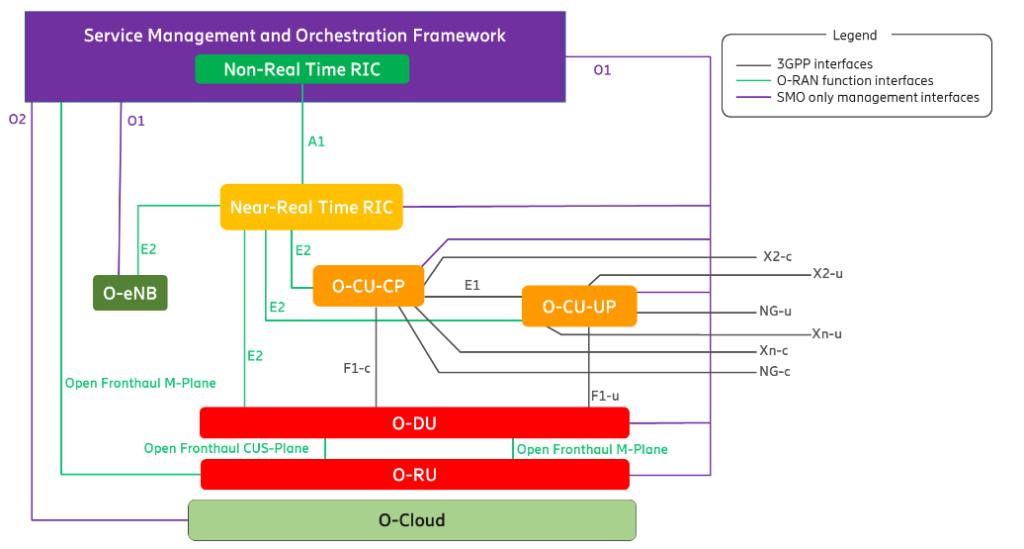
O-RAN architecture has many components but here is the list of the important ones ( taken from O-RAN specifications) that can serve a cheat sheet
O-RAN Architecture ( Ref O-RAN Alliance)
Service Management and Orchestration (SMO)
Non-RT RIC ( Non Real Time RAN Intelligent Controller)
Responsible for the FCAPS of O-RAN network functions. This has an important function called Non-RT RIC, which is used for RAN optimization. Non-RT RIC or Non-real time RIC has the goal of supporting intelligent RAN optimization in Non-real-time (that is greater than one second) by providing policy-based guidance using data analytics and leveraging AI capabilities
Near-RT RIC
Near-RT RIC enables near-time control and optimization of O-RAN nodes ( O-CU AND O-DU). It uses near real-time control loops (i.e. 10 ms to 1 second). Latency is very critical for the Near-RT to take quick decisions. This is in contrast to the Non-RT RIC. Whereas Non-RT RIC can reside far from the Radio Access Network nodes, The Near-RT RIC has to be closer to the RAN nodes owing to the real-time decision functionality.
3GPP Interfaces
3GPP maintains the following interfaces and not O-RAN. Looking closely, the interface from the core network towards the CU and between the CU and DU are the domains of 3GPP. They are already standard and defined by 3GPP. They are already interoperable between the vendors. The O-RAN alliance will not re-work here, as there is no need for that.
Open DU (Distributed Unit) terminates multiple interfaces, but most importantly the fronthaul interface.
O-DU: O-RAN DU is a logical node hosting RLC/MAC/High-PHY layers based on a lower layer functional split.
O-DU is the most popular component and source of innovation in O-RAN as the interface between O-DU and O-RU which is traditionally a closed one is being standardized through a standard version of eCPRI ( Open fronthaul) so that any two vendors can inter-work here.
O-CU-CP and O-CU-UP
O-CU: O-RAN Central Unit: a logical node hosting RRC, SDAP, and PDCP protocols
In fact, it has a control plane and user plane as follows:
O-CU-CP: O-RAN Central Unit–Control Plane: a logical node hosting the RRC and the control-plane part of the PDCP protocol
O-CU-UP: O-RAN Central Unit–User Plane: a logical node hosting the user-plane part of the PDCP protocol and the SDAP protocol
O-RU
O-RU: O-RAN Radio Unit: a logical node hosting Low-PHY layer and RF processing based on a lower layer functional split.
O1 interface
O1: Interface between management entities in Service Management and Orchestration Framework and O-RAN managed elements, for operation and management, by which FCAPS management, Software management, File management shall be achieved.
O-Cloud
Everything is virtual. Isn’t it ? The first question is that where are the virtual functions hosted?
If they are containers, where are the containers deployed? A general name given to the cloud infrastructure is the O-Cloud. It hosts but not limited to O-DU, O-CU-UP, O-CU-UP. The virtualization of the O-RU is for the final study.
Benefits of Open RAN
Reduction in CAPEX
O-RAN can reduce CAPEX through the use of commodity hardware and software. Low-cost white box hardware can reduce the cost of 4G and 5G deployment. It eliminates the vendor lock-in by having multi-vendor interoperable components in the Radio Access Network. This enables a more competitive supplier ecosystem for service providers that can lead to a reduction in CAPEX spending.
Improving Network Efficiency and Intelligence
O-RAN improves network efficiency and performance by leveraging RAN automation. With O-RAN, the status of network resources and performance is continuously monitored and more real-time close loop control loop actions can be taken with less human intervention. O-RAN provides the inherent ability to offer efficient, optimized radio resource management through close loop control and hence can optimize performance and efficiency.
Intelligence is the core principle of O-RAN. The network must be able to operate on its own and continuously learn in order to provide embedded intelligence through the network life cycle.
Increase in Network agility
Thanks to the cloud-native architecture, the software can be easily upgraded without wholesale changes in the network. This also means new services can be rolled out quickly through the introduction of new microservices, thus providing a stepping stone towards agility.
Challenges to Open RAN
Nevertheless, Open RAN has some challenges. Having multiple vendors in the RAN is good, but this would lead to an additional onus on the service provider to play the role of the system integrator or outsource it to another party. In both cases, it’s complex to maintain such a heterogenous network or could be costly. Which can lead to OPEX.
Thats all from my side, There has been a lot of innovation in the Edge and Open RAN is one of them. It is time that you learned about this concept very well.
Now its time that you tell me if Open RAN has a future or not.
O-RAN Use Cases and Deployment Scenarios by O-RAN alliance
OK, you have heard enough of these terms perhaps from RAN vendors? C-RAN vs Cloud RAN vs vRAN vs O-RAN in the context of Radio Access Network ( RAN)
However, these terms are not clear to you because everyone out there explains them in a way that is enough to confuse many. The fact is that they are confusing as the terms are similar and there is not a lot of difference in them.
That is where this blog can help to explain these technologies related to RAN architecture. It will settle the explanation of these terms, once for all.
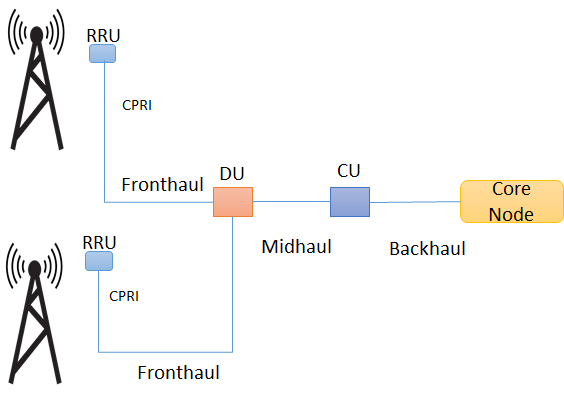
And don’t worry, if you don’t know what is RRU, BBU, CU, DU, fronthaul, mid haul; I will explain all these terms as we go through.
Radio Access Network has evolved quite a bit, so it’s important for you to be aware of all these new terms.
Understanding all this will help in understanding a vendor RAN solution.
C-RAN vs cloud RAN vs vRAN vs O-RAN vs D-RAN (traditional RAN) ? Is it that difficult to understand?
Not exactly, once you understand D-RAN ( traditional RAN), it is easy to understand the rest of them regarding RAN architecture.
Lets go step by step to understand D-RAN ( traditional RAN) first and then moving to other types
The following diagram summarizes the differences but we will explain it in a moment.
D-RAN vs C-RAN vs vRAN vs O-RAN
What is D-RAN ( traditional RAN) ?
D-RAN stands for “Distributed RAN”
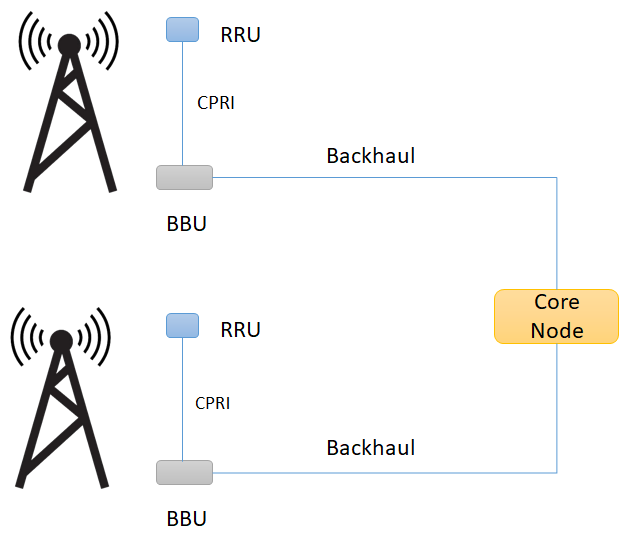
The diagram below shows distributed RAN. The RRU and BBU are co-located at every cell site. Each cell site with all its radio functions are distributed and connected back to the core network through backhaul.
What is D-RAN ( Distributed RAN)
What is it ? BBU: Baseband unit. Manages the whole base station, including operating/maintenance and signaling processing. It decides the “CAPACITY” of the system. RRU: Remote Radio unit interfaces with an antenna on one end and BBU on the other. It connects to BBU through CPRI interface and converts RF signal into data signal and vice versa. Further, it does filtering and amplification of RF signal. In fact, it decides the “COVERAGE” of the system” Antenna: It interfaces a cell phone wirelessly and transmits/receives RF signal. It decides the “SHAPE” of the coverage. Reference: ITU-T
What is C-RAN / Cloud RAN
C-RAN (Also CRAN) stands for Centralized RAN or Cloud RAN. In fact, I have seen the industry uses these terms interchangeably.
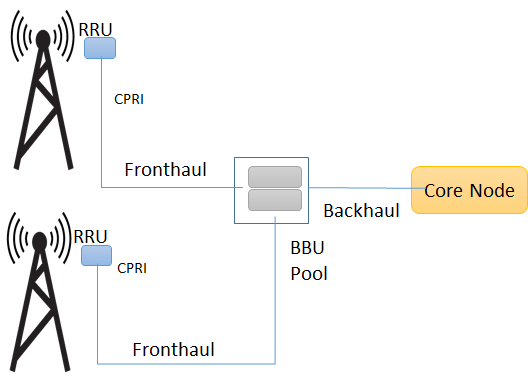
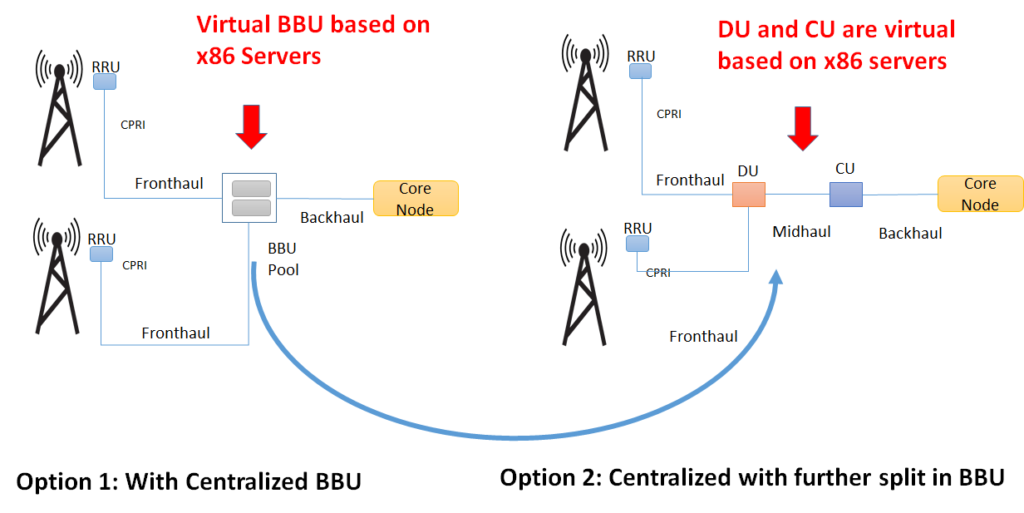
In C-RAN (Cloud RAN) the BBU moves to a centralized location and the cell site only has the antenna and the RRU. This centralization of BBU functionality (also called BBU pool) results in the name centralized RAN or C-RAN.
What is C-RAN ( Centralized RAN/ Cloud RAN) ( Option 1)
This results in a new interface called fronthaul, which is between the RRU and BBU pool. The benefits of C-RAN includes CAPEX and OPEX reduction as deployment and maintenance cost per cell site are reduced because of BBUs centralization. In addition, it improves spectral efficiency and reduces inter channel interferences, as centralized BBUs can share the resources dynamically among the multiple RRUs. The inter-channel interference is eased because of the joint scheduling and processing.
In addition, a second option of the centralized RAN architecture has a further split in BBUs into DU and CU. Here, CU is further towards the core network resulting in a new interface called midhaul.
Option 2: C-RAN with BBU Split
What is it ? Fronthaul Fronthaul is the link between RRU and BBU (or RRU and DU). It has a strict latency requirements of 100 to 250 µs (one way) Midhaul: Midhaul is the link between DU and CU.. Midhaul has relaxed latency requirements, which means we can place CU further closer to the core node. DU: Distributed runs the RLC, MAC, and parts of the PHY layer. We normally place DU closer to RRU. CU: Centralized Unit handles the RRC and PDCP layers (and SDAP in case of 5G) . One CU can connect to multiple DUs, CU can be co-located with DU or far from DU.
What is vRAN or Virtual RAN?
vRAN decouples the software from Hardware by virtualizing Network Functions. It uses virtualization technologies such as NFV or containers to deploy CU and DU over x86 server. (or virtual BBU on a server). This is like running Functions in software.
So there is no difference between vRAN and C-RAN except that traditionally C-RAN uses proprietary hardware while vRAN uses Network Functions on the server platform. vRAN is infact a type of C-RAN.
What is Virtual RAN ?
Because of vRAN HW/SW decoupling flexibility, we can achieve scalability. This can cause a decrease in hardware costs and application agility as application can be upgraded easily or swapped altogether (which is not easier with traditional hardware).
However, vRAN puts servers to new limits because of the performance expectation. There has been quite an innovation on enhancing server platform to meet the performance needs of vRAN.
What is O-RAN or Open RAN?
Open RAN/O-RAN (from O-RAN alliance) takes vRAN to the next level. While traditionally vRAN is a closed network, as RU, DU and CU, which are all part of the RAN must be bought from the same vendor.
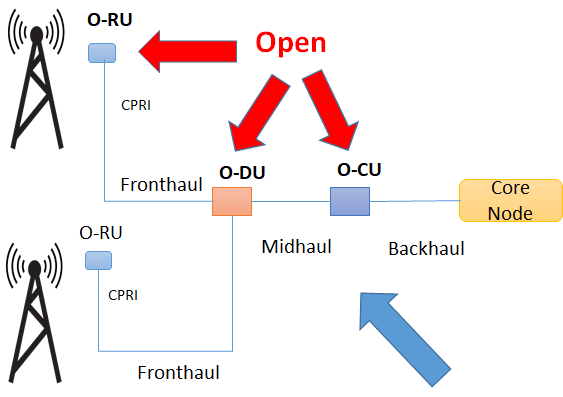
The O-RAN alliance is working on specifications to open the interface between RRU and DU and further between DU and CU. This means that a customer can mix and match the components from different vendors without being locked to one vendor for all these three components, thus resulting in an open RAN network.
WHAT IS OPEN RAN ( O-RAN)
These new open components as per O-RAN alliance’s specs are called O-RU, O-DU and O-CU (where O stands for Open) which is actually a modular base station software stack on off-the-shelf server hardware.
So that’s it about the different between C-RAN , V-RAN and O-RAN. Hopefully, with this you will easily understand a vendor’s solution and also give you an insight on how Radio Access Networks have evolved over the time. Let me know in the comments if the concept is clear to you?
What is SASE or Secure Access Service Edge ?
Is it SD-WAN? Is it something related to security? Everyone talks about SASE, very few are clear on the concept and its positioning versus SD-WAN and Security.
The jargon out there in the literature is enough to confuse many.
I will try to make it easy for you to understand if you follow along. In the end, you will know and appreciate SASE, its benefit and understand exactly the “SASE and SD-WAN difference“
When Gartner used this term for the first time in 2019, many took it for granted. Some ruled it out as having something that could impact the networking industry.
Today SASE has got enough traction with many vendors rolling out solutions under SASE.
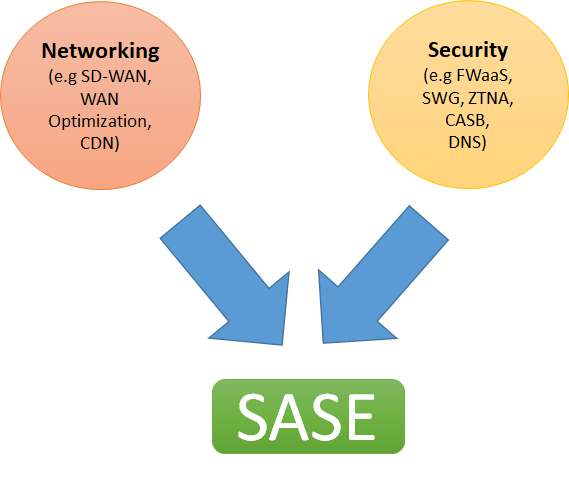
“The secure access service edge is an emerging offering combining comprehensive WAN capabilities with comprehensive network security functions (such as SWG, CASB, FWaaS, and ZTNA) to support the dynamic secure access needs of digital enterprises”
In simple words by Gartner, SASE is a combination of networking and Security.
And as described in simple words by a blog at Gartner here
“SASE combines network security functions (such as SWG ie. Secure Web Gateway, CASB, FWaaS, and ZTNA), with WAN capabilities (i.e., SDWAN) to support the dynamic secure access needs of organizations. These capabilities are delivered primarily aaS and based upon the identity of the entity, real-time context, and security/compliance policies”
“A service connecting users (machine or human) with their applications in the cloud while providing connectivity performance and security assurance determined by policies set by the Subscriber.”
What Problem SASE is trying to solve?
As enterprises transition to digital transformation, more and more applications are moving to the cloud. Applications, no longer reside on-premises or in the data centers and more and more workforce is becoming remote and mobile, the cloud and mobility both present challenges to enterprises.
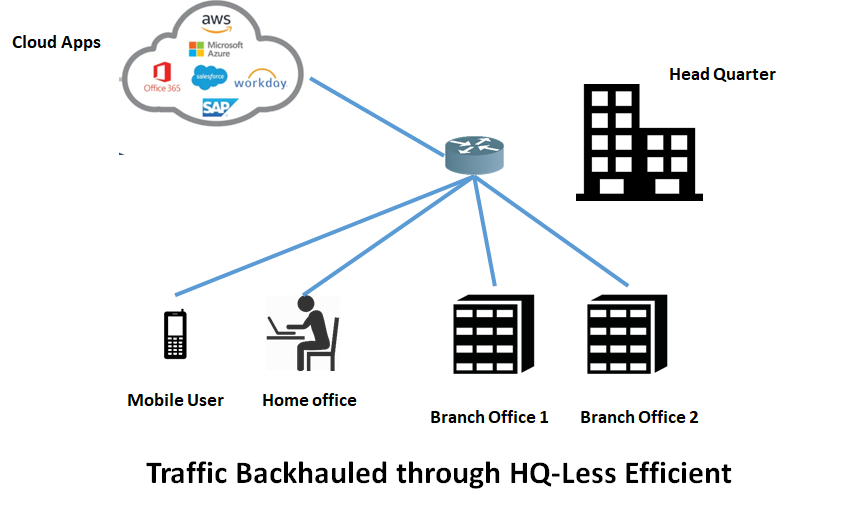
For example, if the data center is no longer the center of applications? Would it make sense to have all connectivity routed through the data centers for security checks as traditional connectivity would demand?
When applications are sprawled all over the cloud, what would be the best way to connect users with applications.
Yes SD-WAN does solve the problem of connectivity by offering users a way to connect to clouds directly bypassing HQ in many cases. However, it is only half the story.
It is easier said than done! How?
It would call for additional security checks most likely at the branch office, itself. Shifting the security nucleus from HQ to the branch offices is not a scalable solution.
Adding more security appliances ( NGFW, IPS, IDS) at the branch offices is both CAPEX and OPEX intensive. It makes the job of the IT team complex to maintain and troubleshoot.
Could there be a better way?
Welcome to the world of SASE!
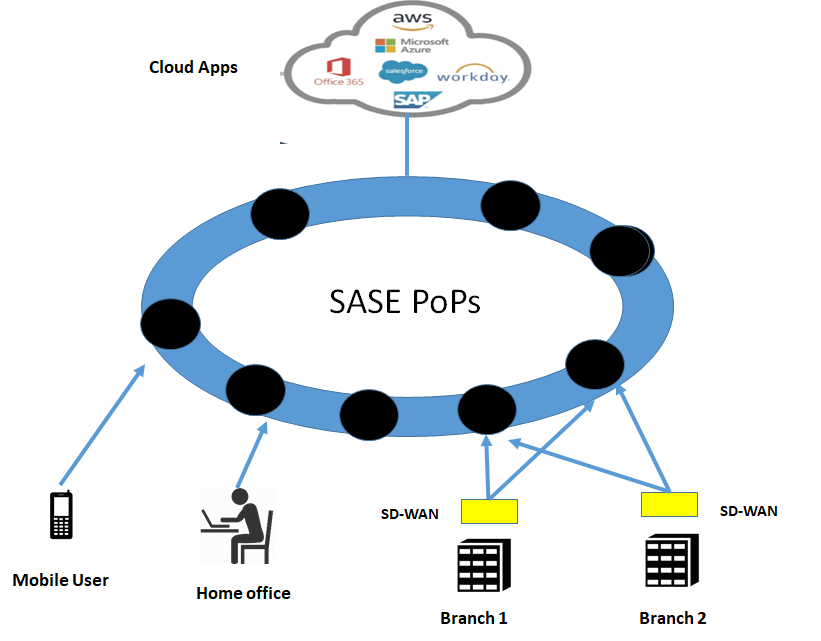
SASE offers a way for enterprises to connect to the clouds directly in a secure way without having advanced security appliances on-site, Security is offered by the cloud itself. The SASE provider would offer its PoP closer to the users offering all advanced features as a service for NGFW, CASB, SWG.
SASE Architecture /SASE Cloud
With SASE latency matter for the applications, The SASE solution, therefore, offers distributed PoPs with some closer to the users to optimize the latency and user experience. SASE will act as a gateway routing the traffic through SASE gateways to the applications elsewhere in the cloud.
The architecture of SASE is based on cloud-native principles. A cloud-native architecture enables agility, elasticity and adaptability
SASE cloud is implemented as a distributed cloud platform. Wherever the edges are, the networking and security features should be available to provide low latency PoP for services.
SASE providers will establish SASE PoPs closer to the users to provide them access to the application.This will enable edge SD-WAN devices to access applications through the cloud that has Firewall as a service, Secure Web Gateway, Advanced Threat protection, all in one cloud.
SASE Architecture
Is SASE only security offering through clouds?
No!
Security has always been offered by security vendors as a service in clouds. Zscaler and Palo Alto have been offering such solutions for quite some time.
There is nothing new here.
What is offered now is an integrated connectivity/SD-WAN offering mixed with the security offering as one solution by ONE VENDOR.
Hold on! But SD-WAN has security functions too? What is the difference between SD-WAN and SASE then? Now before you come back asking, well SD-WAN already has security functions built-in or they can be added as service chaining on demand, what is new with SASE, then?
Let me explain.
As I already explained, SD-WAN strength is “connectivity” and not security. Security was brought in as a feature to help the branch offer secure access without the need for going to HQ.
While this is a workable solution. It is not the most efficient one.
It needs a built-up of security appliances at the branch office itself, which is complex and costly. But more importantly, it does not solve the problem of the mobile workforce ( perhaps individuals) that want to connect remotely to applications for example from another country. That sort of traffic would still need to be brought for security checks at the HQ. Which creates additional latency and longer paths.
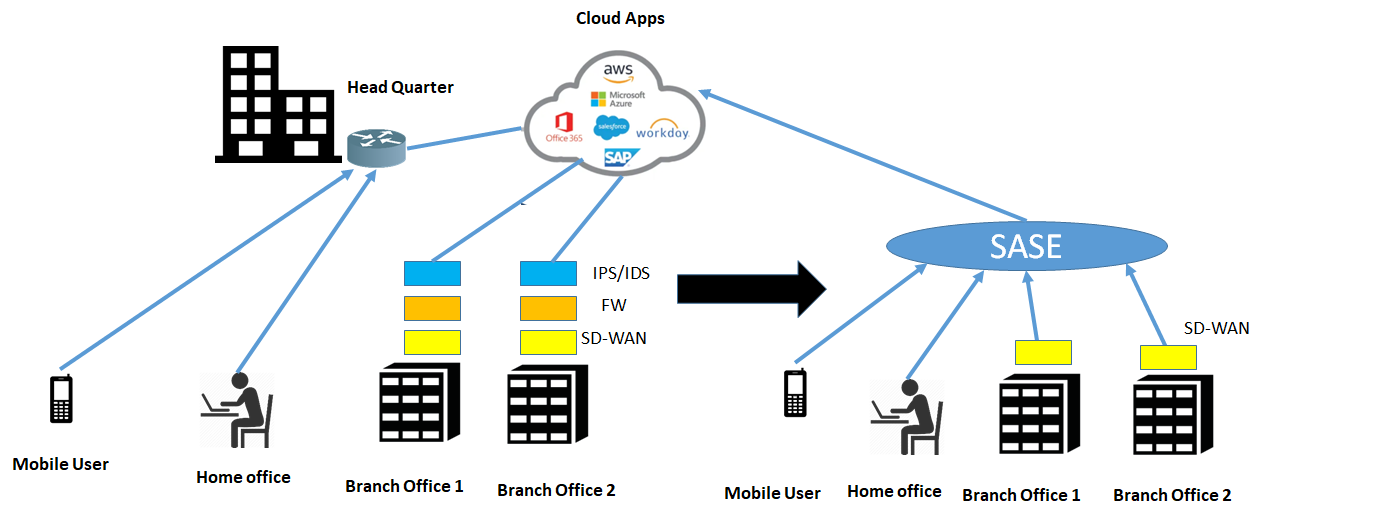
To understand the concept. Consider the following diagram, SD-WAN provides connectivity and security functions at a branch office, however, after transitioning to SASE, the only function needed at the branch office is the SD-WAN router, while all security functions are moved to the SASE cloud.
Traditional Network vs SASE
SASE says that if resources move to the cloud, the most efficient way to build connectivity is to have direct access to the clouds and hence it makes sense to have security checkpoints in the cloud themselves. That is bringing inspection points close to the applications themselves.
Therefore SASE is a convergence of networking ( such as SD-WAN) and network security services ( such as SWG, CASB, and FWaaS, multi endpoint protection). with the added benefit of a centralized management plane enabling a single pane of glass.
Heavy Branch to Cloud-centric Thin branch/SASE models
Naturally, when major functions move to the cloud, the only thing left at branch office is a simple SD-WAN box that provides connectivity to the cloud. This is called “Thin Branch” and heavy cloud model At the site besides SD-WAN, there could be other network functions such as WAN optimization, traffic analysis functionality, etc.
Source Gartner
Identity Driven
One of the important concepts in SASE is that it is Identity driven.
Identity is the most important element in SASE. Every user in SASE has identity, a person, an application service or a device. Examples of user identity include such as Name of a person MAC address of the laptop Identifier of IOT Device The second important item is the context, which includes Location Time of the Day level of assurance ( NIST, X 509 Certificates, etc) With SASE both are important, Identity when attached with the context can provide a dynamic set of security policies that can change as the context changes. This enables a very powerful and rich set of security policies that can be applied to the users of the SASE Cloud.
Benefits of SASE
User Experience
The first and foremost benefit of SASE is the enhanced user experience because of the shorter reach to the destination. Almost all traffic that was supposed to go to the HQ can now be sent to the nearest SASE PoP thus reducing latency and enhancing user experience.
Cost reduction
Costs are reduced as SASE eliminates the need for point solutions. Everything is integrated in a single cloud with some networking part at the customer site. The box at customer sites is simplified to the extent,, that it needs just SD-WAN connectivity up to the nearest PoP of SASE. All the heavyweight processing occurs in the cloud. OPEX is reduced as IT teams need to maintain a converged network and security stack managing all features and policies from a single interface
Mobility
The biggest advantage for the SASE for business is enabling mobility of the users. With the world changing to the mobile workforce, remote users ( some workforce from can connect to their enterprise/business cloud or application clouds from anywhere in the world without worrying about the security and without the need to dial in their corporate VPNs. Also home has become the office for the workforce today. All they have to do is to connect to the nearest PoP of the SASE provider. SASE simplifies the authentication process by applying appropriate policies for the relevant resources which a user seeks.
Less Complexity, Less Integration
With preferably one provider for SD-WAN and security, there will be no need for complex integrations because of service chains. Having multiple security vendors/functions in a service chain requires a lot of integration which results in delays to provide service and CAPEX spending So that’s it an introduction about SASE ( Secure Access Service Edge and I hope it is clear now on “what is sase ?”. Go ahead and comment below on what do you think as the future of the SASE.
One final word. SASE is still not part of the Gartner magic quadrant but I expect that it will become sooner or later considering the market traction for SASE
Let’s face it, we all love to have everything cloud native based including cloud Native VNFs. In practice, however, we need to live with the legacy VNFs.
The legacy VNFs are monolithic with bulky code and operated in some cases as all in one virtual machine. They can be called virtual, but not cloud-based or “cloud-native” to be more specific.
If you want a quick overview on what is cloud native, you can see my other blog.
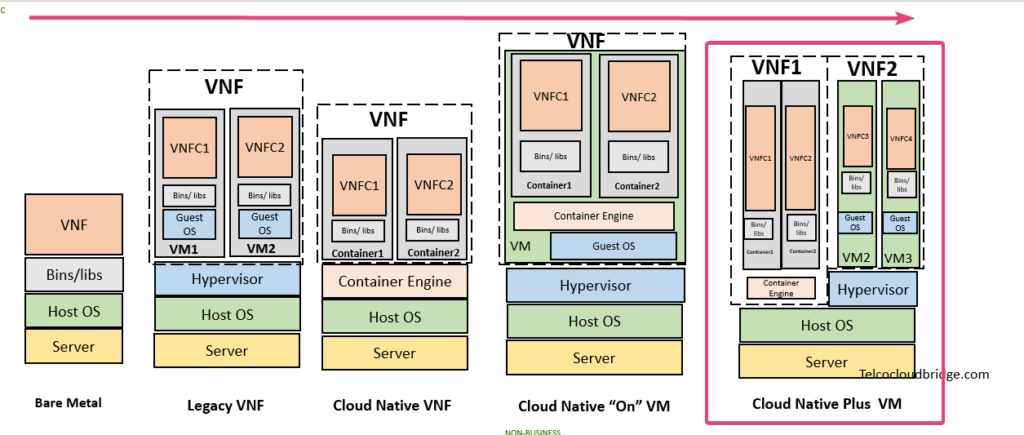
To understand and appreciate a cloud native VNF, I take you through a journey starting with the bare metal, then a legacy VNF, and finally a cloud native VNF.
Before I take you through that journey, I would like to point out one simple thing that can help you understand how VNFs normally work. While a VNF can be one VNF to one VM. That is VNF is one component that completely occupies the virtual machine.
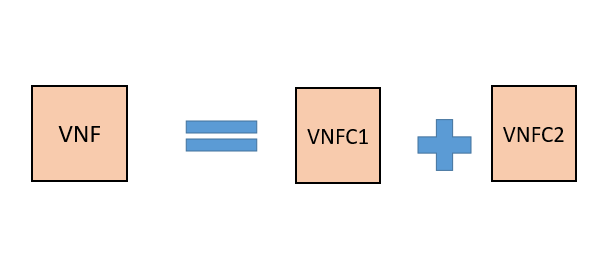
In practice, however, VNF consists of multiple components also called microservices or VNFCs (VNF Component) as ETSI called them. As VNFs can be quite complex such as an EPC in the mobile network, no vendor will make an “All in one” VNF that occupies a single Virtual machine. It will be many small VNFCs that are connected and together give a VNF functionality.
So lets say our VNF here consists of two VNFCs like following which we will be using in our example.
VNF and its Components
Having understood this components of one VNF, let’s now begin our journey.
Bare Metal
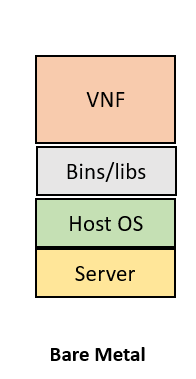
In bare metal, we run the application/VNF directly on the server. This is the legacy way to run applications. Take a server and install the application. There is no way to slice/partition the server to run more applications/VNFs. However the advantage is that the single application get access to the complete compute, storage and memory resource of the machine.
So in our case, it is not possible to run our example VNF that has two components as above. What is possible is to run any single component VNF directly on the operating system ( such as Linux) of the bare metal as shown below.
Bare Metal VNF
Legacy VNF
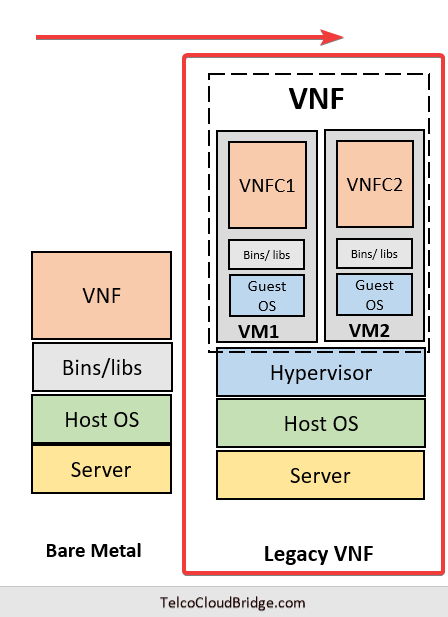
As a legacy VNF runs on the virtual machine, you would need two virtual machines to run this VNF. Additionally, the virtual machine would need a hypervisor to slice the server into multiple logical servers. With two virtual machines available, it is possible to keep each VNFC in a different virtual machine.
Do take a note, however, that a Virtual machine would need to have a separate Operating system ( OS) called guest OS on top of the host OS. This is an extra burden on a server as you would understand shortly by comparing it with containers
Legacy VNF
Cloud Native VNF
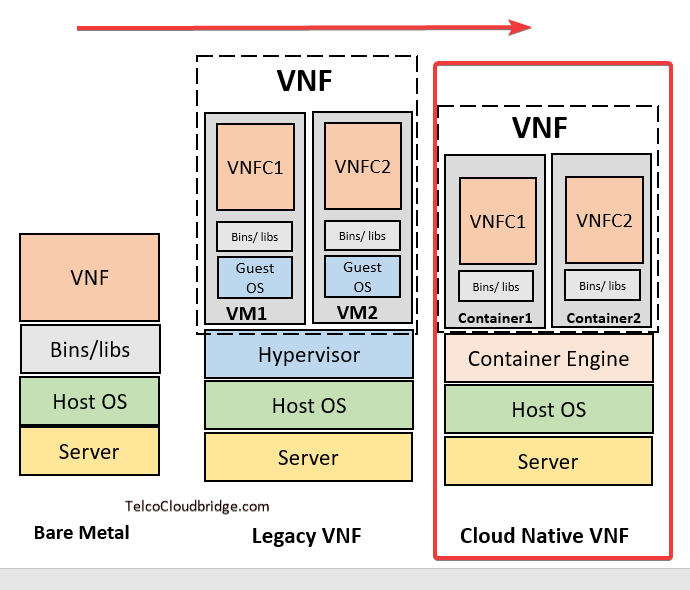
Cloud Native VNFs make use of containers. Thanks to the lightweight size of the containers that do not need a separate guest OS, it is possible to run each VNFC as a different container directly on the host OS. You do not need a hypervisor, but you will need a container engine to enable spinning up the containers.
As you probably already have guessed that a Cloud Native is a preferred approach to building up VNF applications today as they are lightweight because they host on the same Linux kernal of the host machine without the burden of the need for additional guest operating system.
But here is a challenge. How do keep different cloud Native VNFs separate from each other? Would you really run containers of one vendor in the same containerized environment as another vendor?
Thats take us to the more practical approach to running cloud Native VNFs today.
Cloud Native VNFs “On” VM
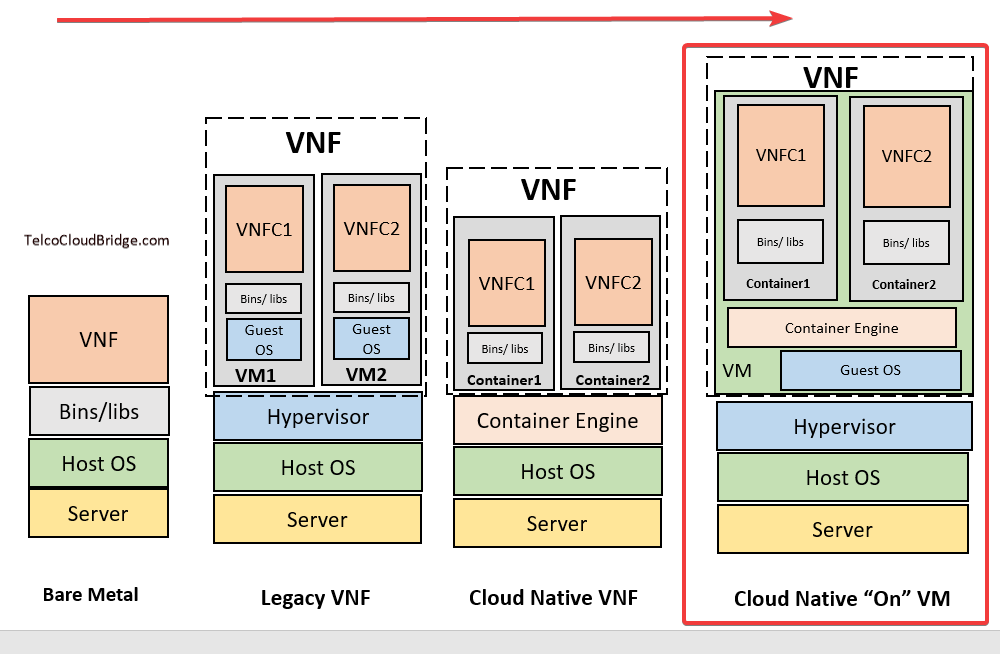
The most practical way followed today is to keep different cloud native VNFs on different VMs. That way you can enjoy the flexibility of running a lot of these containers within one VNF and at the same time isolation between different VNFs ( perhaps of different vendors).
So a setup like the following will allow you to add a second VNF easily in a second VM on the same server.
Cloud Native VM on VM
Cloud Native VNFs Plus VMs
We run in a practical world.
There will be legacy VNFs along with cloud Native VNFs for quite some time as we have already deployed a lot of legacy VNFs in the network and before they phase out to a more modern VNF based on cloud native application. A variation of this is to have Cloud Native VNFs run directly on the server in parallel to legacy VNFs in VMs. In this diagram you say a legacy VNF2 running with a cloud native VNF1 on the same server.
Cloud Native + VM
What is the future ?
Future is all about cloud Native VNFs. There will be a time when legacy VNFs will be phased out. Then there will be a stage with containers are developed and mature enough to provide enough isolation to start running Cloud native VNFs of different vendors on the same Linux OS. That will be the time when perhaps there will be no need to have a virtual machine and a world that can live without virtual machines forever. When this happens. We are not sure at the moment.